NFL · Contest simulator guide
NFL contest simulator: CSV lineups, field settings and ROI
Evaluate uploaded lineups against a modeled field, then check what the ROI and top-finish probabilities actually refer to.
This guide and its screenshots are public. Tool access depends on your membership. Screenshots show interface examples; data and available slates change.
Match the contest before generating opponents
Choose site, format and slate first. Classic and Showdown use different roster slots, salaries and player IDs. Select the intended contest or enter the field size, entry fee, maximum entries and payout assumptions carefully.
- Review the contest size and payout table, including paid places, rake and first-place share.
- Use Upload lineups CSV where it is available for the selected site and format. Read any rejected-row or player-pool message.
- Verify the uploaded count and roster roles before generating the opponent field. Switching the site, format or slate can invalidate that upload.
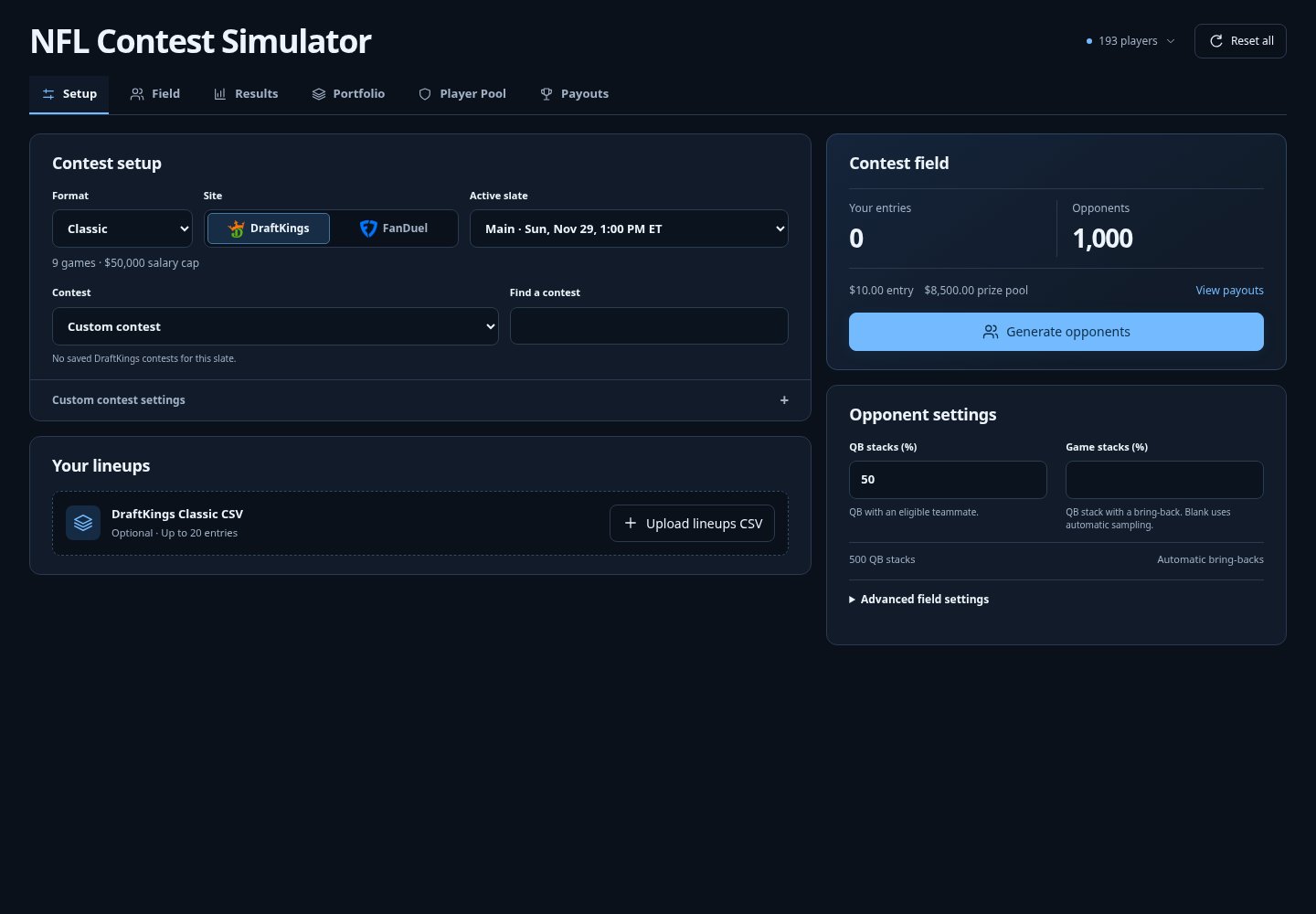
Use the entry format the uploader expects
Export lineups for the same site and slate you selected in Setup. The importer validates the roster columns and player matches; changing a CSV header or combining files from different formats can cause a rejection.
Keep an untouched copy of your entry file. If the player pool changes, re-upload the lineups and check the count again. A lineup accepted by the importer is structurally usable by the simulator; that does not establish that you have entered it into a live contest.
Inspect the competition you generated
Review Lineup profile, Field strength, QB stacks and Game stacks where shown for Classic. Minimum salary used, randomness and allowed off-optimal settings also influence which opponents are generated. A field of weak, low-salary lineups can make a strong uploaded set look unusually good.
In Field, compare player exposure and lineup totals with the supplied projected ownership and your understanding of the contest. Check the ownership source shown for the slate. If ownership is missing or the source uses projection and salary weights, do not read the field as an observed real-world contest.
Separate one lineup from a set of lineups
A top-1% probability for one lineup and the probability that at least one of your entries reaches the top 1% answer different questions. Read the row or summary label before comparing a percentage with the 1% contest cutoff.
| Metric | What to check | Useful interpretation |
|---|---|---|
| Lineup ROI | One lineup, fee, payouts and modeled field | Model-based expected return for that entry. |
| Portfolio result | Which uploaded entries are included | Combined outcomes can share the same players and games. |
| Top-1% probability | One lineup or at least one portfolio entry? | Do not compare a portfolio event with a single-entry baseline. |
| Cash rate | Paid places and ties | More cashes do not necessarily mean better expected ROI. |
Stress-test a result that looks too good
Suppose the summary shows an 80% chance of a top-1% result. First check whether it refers to one lineup or your entire uploaded portfolio. Then check the number of opponents, duplicate handling, payout table, field exposures and generated lineup strength.
Run a second comparison with a stronger plausible field while keeping your uploaded set unchanged. Keep the contest and payout assumptions consistent. If the apparent advantage disappears after a modest change, that is useful information about how dependent the estimate is on the field model. Increasing simulation runs reduces sampling noise; it does not fix a weak opponent model.
Use the output to compare decisions
- Record the site, slate, contest settings, lineup count and field assumptions.
- Compare two plausible builds or one controlled change rather than selecting only the largest displayed ROI.
- Review the players and games shared across your portfolio.
- Keep a surprising result provisional until field and payout checks explain it.
- Export the selected portfolio separately, then verify entries on the contest site.
Continue with NFL
Use the NFL tools overview to find the related research and lineup tools, or check the update schedule before starting a new slate.
Related walkthroughs
NFL · Optimizer
NFL optimizer: stacks, exposure and correlation
Start with five lineups, set QB stacks and bring-back limits, then review exposure and export the right site file.
NASCAR · Contest simulator
NASCAR contest simulator: build the field and review a portfolio
Use contest payouts, field assumptions and driver exposure to compare lineup sets for Cup, O’Reilly and Trucks.